
Most platform engineers assume they need better cloud networking tools. AWS security groups, GCP firewall rules, and Azure NSGs are genuinely capable primitives, but they’re not portable. You’re writing the same networking logic three times, in three different syntax systems, for three different rule models, and calling it a multi-cloud strategy.
A concrete version of that problem: your team runs workloads on AWS us-east-1 and GCP us-central1. On AWS, you’re managing security groups attached per ENI, stateful allow-only rules, and IAM role bindings per service. On GCP, you’re managing network-scoped firewall rules with target tags or service account selectors, plus a separate VPC-native routing config. The two rule models use different attachment mechanisms, evaluation semantics, and scoping models. Adding a third region (say, your own private datacenter) triples the surface area.
Every new cloud or region you add multiplies the configuration your team has to write, test, audit, and keep in sync. This compounds permanently: one security policy change means updating two or three systems with structurally different rule models. Config drift, missed updates during an audit, and misconfiguration under pressure are all downstream effects of the same root cause: the absence of an abstraction layer above the individual cloud networking primitives.
Network virtualization and SDN provide that abstraction layer. This guide covers how it works at a technical level (overlay protocols, virtual switches, SDN controllers) and what it looks like when a platform abstracts provider-specific details, without requiring you to manage provider-specific networking configuration for routine deployment and connectivity.
Network virtualization: decoupling logical from physical
Network virtualization separates the logical network topology (IP addressing, routing rules, security policies) from the physical infrastructure those policies run on. When you change a routing rule or update a security policy, you change it in software against a logical model, and that change propagates to the underlying infrastructure automatically, with no manual device reconfiguration required.
Virtual LANs (VLANs) are an early form of network virtualization. You segment a physical switch into multiple logical networks using 802.1Q tags. VLANs are limited to Layer 2, constrained to 4,096 segments by the 12-bit tag, and require careful physical switch configuration to propagate across locations. Modern network virtualization adds the ability to span those logical networks across arbitrary physical boundaries, including across public clouds that don’t share infrastructure at all.
Overlay networks: VXLAN and GENEVE
The mechanism that makes this possible is the overlay network. An overlay encapsulates Layer 2 Ethernet frames inside UDP packets, tunneling them across an underlay network (the physical or cloud-native IP fabric beneath). This allows a logical network to behave as if it spans a single flat Layer 2 domain, even when the actual physical paths cross data center boundaries, cloud regions, or cloud providers.
VXLAN (Virtual Extensible LAN), defined in IETF RFC 7348, is the most widely deployed overlay protocol. It uses a 24-bit Virtual Network Identifier (VNI) to identify logical network segments, supporting up to 16,777,216 distinct segments on the same physical fabric, roughly 4,000 times more than VLANs. Each tunnel endpoint is called a VTEP (VXLAN Tunnel Endpoint). Packets entering the overlay are encapsulated at the source VTEP and decapsulated at the destination VTEP, with the VNI telling the destination which logical segment the frame belongs to.
GENEVE (Generic Network Virtualization Encapsulation), defined in RFC 8926, extends the same encapsulation concept with variable-length option headers, letting tunnel endpoints carry metadata alongside the encapsulated payload. That flexibility supports service chaining, security tagging, and telemetry. Open vSwitch (since version 2.6) and the Linux kernel’s native GENEVE tunnel driver both support GENEVE alongside VXLAN, though VXLAN remains more widely deployed in production environments built over the last decade.
Virtual switches: the data plane execution point
An overlay network tells you how packets move between logical segments, but something on each host has to actually forward those packets according to the rules defined in the overlay. Open vSwitch (OVS) is a widely deployed, production-quality open-source virtual switch. It runs on bare-metal servers and inside hypervisors using kernel or userspace datapaths, sits in the packet path between the physical NIC and the virtual NICs of the workloads running on that host, and forwards packets according to a programmable forwarding table. When integrated with an external SDN controller, the forwarding table is managed via OpenFlow for flow behavior and OVSDB for configuration state, replacing manual SSH-based management. That’s the foundation of the SDN architecture described in the next section.
SDN architecture: how the controller and data plane split works
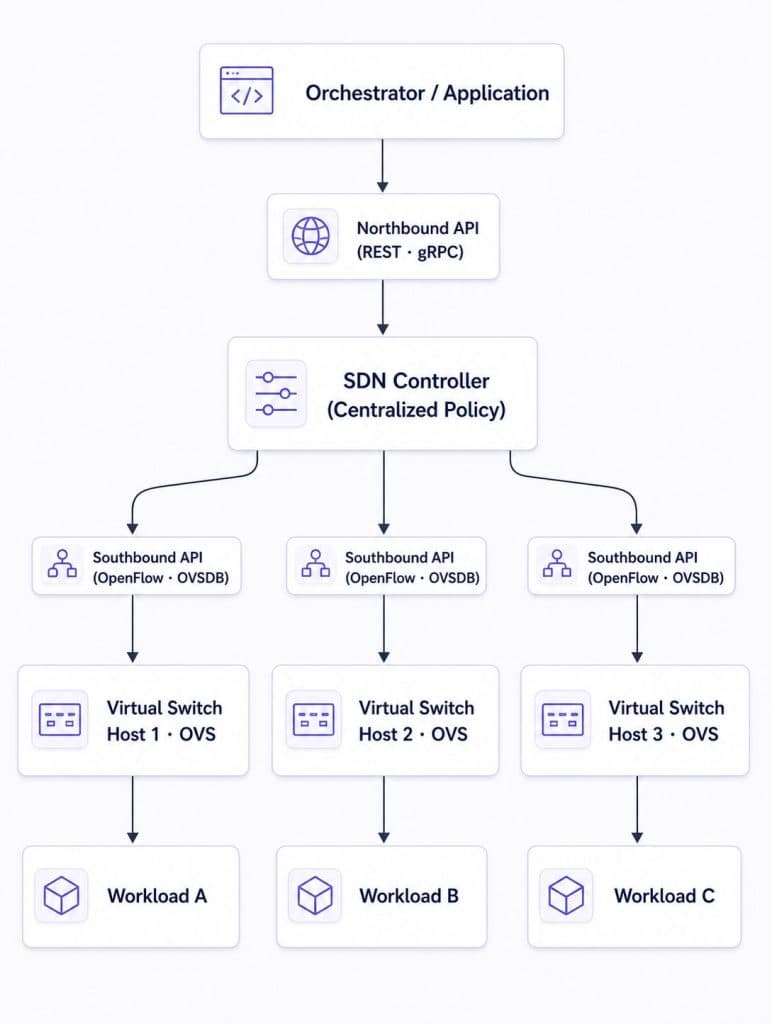
Software-Defined Networking (SDN) formalizes the separation between two functions that traditional network devices bundle together: the control plane (routing decisions) and the data plane (packet forwarding). In a traditional router or switch, both live in the same box. In an SDN architecture, the control plane is logically centralized in a software controller, and the data plane devices (virtual switches like OVS) become programmable forwarding engines. A single API call to the controller updates policy and distributes changes across the affected switches in its domain, with no per-device SSH sessions required.
Northbound and southbound APIs
The controller exposes two API surfaces. The northbound API (typically REST or gRPC) faces upward toward orchestrators and applications. You submit policy intent here: allow traffic from service A to service B on port 8080, deny all other inbound. The controller translates that intent into forwarding rules. The southbound API faces downward toward the virtual switches and network devices. OpenFlow is a foundational and widely used protocol for programming flow tables in software switches like OVS, while NETCONF and gNMI handle device configuration and telemetry for physical and virtual network equipment.
A policy change through this architecture skips the per-device SSH session entirely. You make one API call to the controller, the controller computes the affected rules and distributes them to the affected switches in its domain. Central policy distribution reduces configuration drift compared to device-by-device management.
What this means for multi-cloud
A multi-cloud control or orchestration layer can apply the SDN principle at the cloud API level. It exposes a common policy model while abstracting provider-specific networking APIs and infrastructure constructs. In this model, the orchestration layer becomes the source of truth for application-level network intent, while each cloud remains an execution environment.
That architectural shift is what makes a meaningful multi-cloud networking strategy possible. It requires solving a real structural delta: cloud networking models are built on different assumptions about how network scope is defined, not merely different in syntax.
The delta: why native cloud VPCs don’t solve the consistency problem
Native cloud VPC primitives use different attachment mechanisms, evaluation semantics, and scoping models across providers, so no amount of per-cloud configuration closes the consistency delta without an abstraction layer above them.
AWS VPC is regional. A VPC exists within a single region. Resources in us-east-1 and resources in us-west-2 live in separate network namespaces by default. To move traffic between them, you need VPC Peering, AWS Transit Gateway, or a VPN, each with its own routing table entries and security group adjustments. Add a third region, and the complexity compounds. A policy that controls traffic between services in us-east-1 doesn’t automatically apply to those same services after they’re deployed to us-west-2.
GCP VPC is global. A single VPC spans all regions by default. A subnet in us-central1 and a subnet in europe-west1 are part of the same network namespace without any peering or gateway configuration. GCP’s networking model was designed around global routing from the start. That creates an immediate problem when you try to write policies spanning both AWS and GCP: a policy scoped to “this VPC” means two completely different things depending on which cloud you’re talking to.
Security policy syntax divergence
AWS security groups are resource-attached. They associate with a specific Elastic Network Interface (ENI), evaluate allow-only rules (there’s no deny), and apply statefulness, meaning a connection allowed in one direction is automatically tracked in both. To control traffic between two services in different security groups, you reference a security group ID as the source or destination rule target.
GCP firewall rules are network-scoped. They apply to all resources in a VPC unless you narrow the target using network tags or service account selectors. They support both allow and deny rules, use explicit priority ordering, and apply network-wide rather than per-ENI. Implementing the same logical policy (“allow HTTP traffic from the API gateway service to the backend service”) on GCP requires a different rule using a different targeting mechanism.
The mental models behind these systems differ at a structural level, which means implementing the same security posture across both clouds requires two completely separate sets of rules that you maintain independently, in sync, indefinitely.
Identity mismatch for service-to-service calls
The same structural divergence appears in service identity. AWS workloads obtain IAM credentials through mechanisms such as EC2 instance profiles, IAM Roles for Service Accounts (IRSA), or EKS Pod Identity. GCP workloads commonly use Workload Identity Federation for GKE. These are different identity systems with different attachment mechanisms, token formats, trust configurations, and policy languages. There is no single provider-neutral identity model that spans both environments.
Native federation mechanisms exist on each side, but each provider’s solution uses its own identity objects, trust configuration, and policy language. Teams still need to design, configure, and maintain federation in each direction separately, and the operational workflow differs across providers. Flexera’s 2026 State of the Cloud report found that 89% of enterprises run multi-cloud strategies, but that number reflects adoption, not solved problems. The identity fragmentation described above is one of the persistent operational costs that adoption alone does not address.
An abstraction layer built into the platform can address both the network policy problem and the identity consistency problem across clouds. The next section covers what that looks like in practice.
How Control Plane’s GVC handles the abstraction automatically
The previous sections covered the foundational building blocks of network virtualization: overlay protocols, virtual switches, and SDN controllers. Control Plane applies the same principle of separating logical intent from infrastructure specifics, but at the cloud API level rather than at the packet-forwarding layer. Its policy model abstracts provider-specific networking rather than programming individual switch flow tables. The details below describe the platform’s externally observable behavior as documented in its public API and CLI.
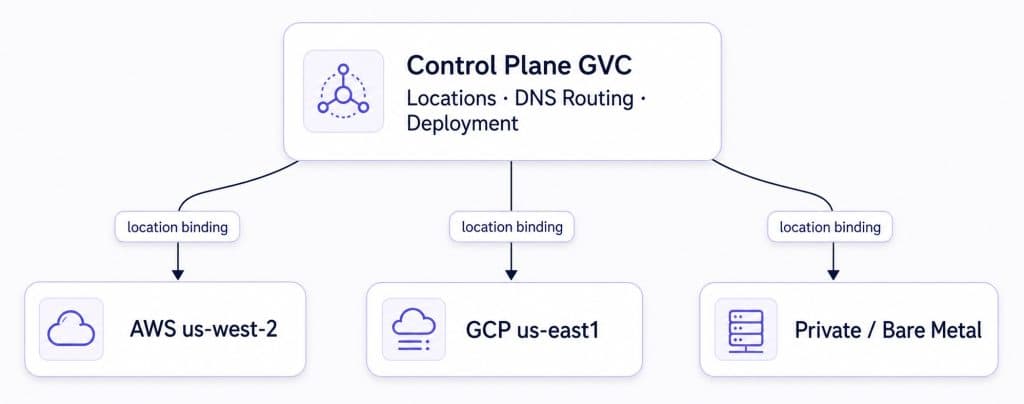
Control Plane is a cloud virtualization platform that sits above AWS, GCP, Azure, and private infrastructure, exposing a single API surface for networking, identity, and workload deployment across all of them. The core construct is the Global Virtual Cloud (GVC), a named environment that groups cloud provider locations into a single deployment target. Workloads deployed into a GVC use a common multi-cloud deployment, DNS, and routing model. Firewall settings are configured consistently at the workload level, while optional Identity resources are scoped to the GVC and assigned to workloads that need cloud-provider access.
When you create a GVC, you’re declaring logical intent (“I want a multi-location network across these two clouds”) and the platform abstracts provider-specific infrastructure details. You’re configuring a logical model, with no VPCs, security groups, or route tables to manage directly.
One command to span two clouds
cpln gvc create --name my-app-gvc \
  --location aws-us-west-2 \
  --location gcp-us-east1
The GVC creates a unified deployment target across both clouds, with shared DNS routing and consistent workload-level firewall configuration. Identity resources for cloud-provider access are scoped to the GVC and assigned per workload. No VPC peering to configure, no Transit Gateway to set up, no firewall rules to write in two syntaxes.
Adding a location later doesn’t require touching cloud-specific config either. The simplest option is the dedicated CLI subcommand:
cpln gvc add-location my-app-gvc --location aws-us-east-1
You can also update the GVC spec via cpln apply (adding the new location to spec.staticPlacement.locationLinks) or use the Console UI (navigate to the GVC, click Edit, then Add Location). The GVC’s deployment footprint expands without you touching AWS, GCP, or any other cloud provider’s console.
What the abstraction delivers
External traffic hits $workloadName-$gvcAlias.cpln.app and routes via latency-based DNS geo-routing to the nearest healthy location automatically. If your my-app-gvc has locations in aws-us-west-2 and gcp-us-east1, a user in Seattle might be routed to AWS us-west-2 and a user on the East Coast to GCP us-east1, depending on measured latency, location health, and the GVC’s routing configuration, without any DNS configuration or load-balancer setup on your part.
Inter-workload traffic uses internal DNS names in the format <workload-name>.<gvc-name>.cpln.local. An API service calling a backend service uses the same DNS name whether both workloads land on AWS or one lands on GCP. The name resolves correctly regardless of where each workload runs. You set the associated firewall policy via firewallConfig.internal.inboundAllowType, the same field with the same syntax regardless of which clouds are in scope.
Universal Cloud Identity addresses the service identity problem described above. Workloads running inside a GVC can access authorized AWS, GCP, or Azure resources without storing provider credentials in the workload. You configure cloud accounts, roles, service accounts, and least-privilege policies as an Identity resource scoped to the GVC. Each provider-specific identity setup is managed once and assigned to workloads that need cloud-provider access, rather than solved independently per team.
Control Plane was founded by Doron Grinstein, formerly Chief Software Architect at VMware’s Cloud Services Platform. The GVC’s abstraction model reflects the same architectural thinking that separated logical from physical in the virtualization era, applied to the multi-cloud networking problem.
Get a multi-cloud network running
The Control Plane CLI takes you from zero to a running multi-cloud network in a handful of commands. Start by verifying your CLI is installed and authenticating:
cpln --version
cpln login
cpln profile update default --org YOUR_ORG_NAME
Create the GVC:
cpln gvc create --name quickstart-gvc \
  --location aws-us-west-2 \
  --location gcp-us-east1
Set it as your default context:
cpln profile update default --gvc quickstart-gvc
Deploy a test workload into the GVC:
cpln workload create \
  --name hello-world \
  --image gcr.io/knative-samples/helloworld-go \
  --port 8080 \
  --public
Once the workload is running, hit hello-world-quickstart-gvc.cpln.app. It’ll route to the nearest healthy location based on your actual network latency, without any DNS configuration written by hand. To verify which location served the request, first enable the workload’s Debug option in the Console and wait for the workload to redeploy. Then send a request with the debug header:
curl -sD - -o /dev/null -H "x-cpln-debug: true" https://hello-world-quickstart-gvc.cpln.app
The x-cpln-location response header shows the serving location. You can also use location-specific endpoints in the format $workloadName-$gvcAlias.$locationName.controlplane.us to test each location directly.
If you prefer a UI-based setup, the Control Plane Console walks through GVC creation via a form (Create, then GVC, then Add Location). The UI and CLI produce the same resource: a GVC spec with location bindings.
Full architecture reference:
docs.controlplane.com/concepts/gvc.
Step-by-step creation guide:
docs.controlplane.com/guides/create-gvc.
Related background on VPC fundamentals: What Is VPC and VPN and How Do They Relate?
Frequently asked questions
Network virtualization decouples logical network topology (IP addressing, routing rules, security policies) from the physical infrastructure these policies run on. Each cloud provider uses a structurally different networking model, so a virtualization layer above those models lets you use a common policy model consistently across AWS, GCP, Azure, and on-premises infrastructure.
VXLAN (RFC 7348) uses a fixed 24-bit VNI header to identify logical network segments and is the most widely deployed overlay protocol in production today. GENEVE (RFC 8926) extends this with variable-length option headers that carry metadata such as security tags and telemetry alongside the encapsulated payload. GENEVE gives you more flexibility for service chaining, while VXLAN has broader legacy hardware support.
SDN separates the control plane (policy decisions) from the data plane (packet forwarding). At the infrastructure layer, a controller’s northbound API accepts intent-based policy from orchestrators, and its southbound API pushes translated forwarding rules to virtual switches. A multi-cloud platform can apply the same principle at the cloud API level, abstracting provider-specific networking behind a common policy model.
AWS VPC is regional, so each region is a separate namespace requiring explicit peering or Transit Gateway configuration. GCP VPC is global by default. These structural differences mean a policy scoped to “this VPC” carries different semantics on each cloud. Native VPC primitives use different attachment mechanisms, evaluation semantics, and scoping models, so you end up maintaining parallel rule sets indefinitely.
A GVC is Control Plane’s multi-cloud network abstraction. A VPC is scoped to a single cloud provider (regional on AWS, global on GCP). A GVC spans multiple cloud providers and regions simultaneously as a unified deployment environment. DNS and routing are managed at the GVC level, firewall policy is assigned per workload, and cloud access Identity is a GVC-scoped resource, without requiring you to configure each provider separately.
Control Plane’s Universal Cloud Identity provides GVC-scoped cloud-provider access. Workloads assigned an Identity resource can access authorized AWS roles, GCP service accounts, and Azure credentials without storing provider credentials in the workload. Identity policies define least-privilege access per provider.
When external traffic hits a workload’s public endpoint ($workloadName-$gvcAlias.cpln.app), Control Plane’s latency-based DNS routes the request to the nearest healthy location automatically. No DNS configuration or external load balancer setup is required. Adding a new cloud region to the GVC extends geo-routing to that region without any additional DNS work.
Inter-workload traffic within a GVC uses internal DNS names in the format <workload-name>.<gvc-name>.cpln.local. This name resolves correctly regardless of which cloud the target workload runs on. You set the associated firewall policy via firewallConfig.internal.inboundAllowType, the same field with the same syntax across all clouds in the GVC.
Final thoughts
The SDN market is on track to reach $101.33 billion by 2030 at a 17.9% CAGR, driven by sustained demand for consistent, abstracted network policy across heterogeneous infrastructure. Most writing about SDN and multi-cloud networking stops at the concept level. This guide covered the technical foundations (overlay protocols, virtual switches, control/data plane split) because the implementation choices you make should follow from understanding the architecture, not the marketing claims around it.
Your network policy should live in one place, in one syntax, and propagate to wherever your workloads run. Building that yourself, cloud by cloud, is possible, but choosing a platform that ships it as a first-class construct is faster.
Book a product demo to see how Control Plane’s GVC handles multi-cloud networking automatically.