
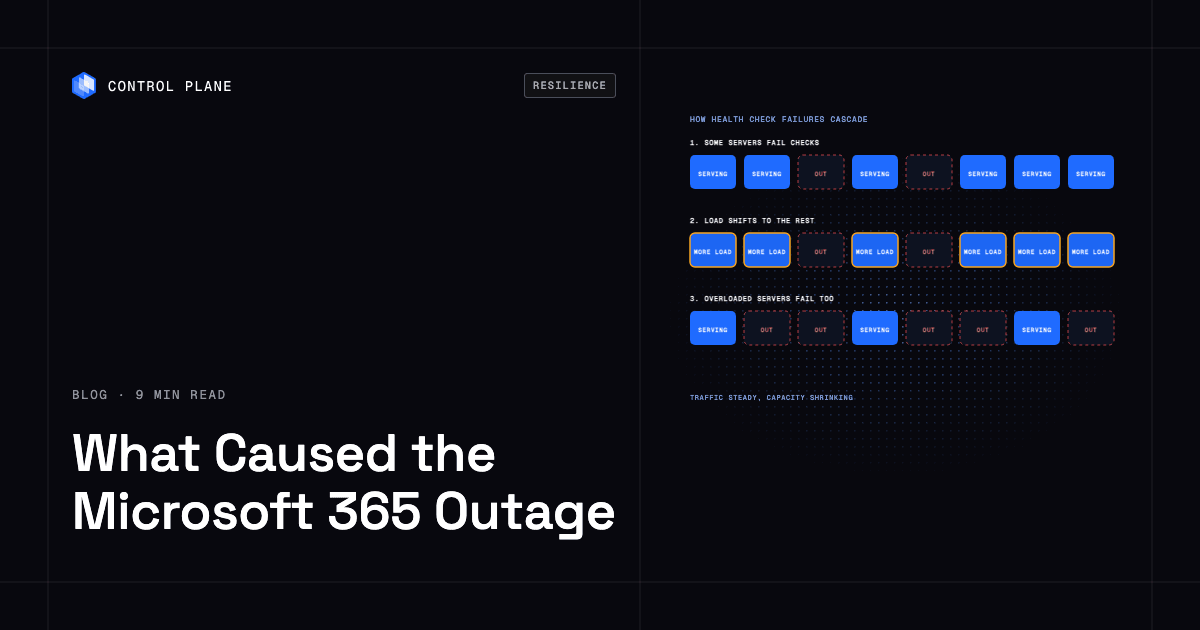
The Microsoft 365 outage that began on November 12, 2026 was caused, according to Microsoft’s status updates, by servers in the Exchange Online service unexpectedly failing automated health checks and dropping out of service, which pushed more load onto the servers that remained until they were overwhelmed too. Microsoft has said the load was not caused by a rise in traffic, has reported no indication of malicious activity, and has not yet published a post-incident review, so the underlying trigger is still unknown.
Disclosure: Control Plane publishes this guide. It summarizes what Microsoft and the press have reported as of November 13, 2026, and will be updated when Microsoft publishes its post-incident review.
TL;DR
- What happened: Exchange Online, Outlook, Teams, Microsoft 365 Copilot, SharePoint Online, Intune, Defender for Office 365, and other Microsoft 365 services were degraded worldwide, starting in the Americas.
- When: the main incident (MO1550821) began at 18:26 UTC on November 12, 2026 and was still recovering more than 20 hours later.
- Stated cause: servers failing automated health checks and becoming unavailable, which strained the remaining infrastructure. Microsoft said the problem may originate in a component responsible for processing server health.
- Not caused by traffic or, per Microsoft, by an attack: Microsoft said the load was not driven by an increase in traffic and that it had no indication of malicious activity.
- Azure: Microsoft’s Azure status page showed no active events, and Microsoft has not confirmed impact on customer-hosted Azure workloads.
- Still unknown: what made the servers fail in the first place, whether a deployment or configuration change was involved, and the final duration.
What happened, in order
Every time in this table comes from Microsoft’s status updates as reported by BleepingComputer and The Register.
| Time (UTC) | Event |
|---|---|
| Nov 12, 14:45 to 15:53 | A separate, earlier Teams incident (TM1550488) is opened and resolved |
| Nov 12, 18:26 | Main incident MO1550821 begins; Exchange Online and Outlook users in the Americas report problems |
| Nov 12, later | Impact spreads to other regions and to services that depend on Exchange Online, including Teams, Copilot, SharePoint Online, Intune, and Defender |
| Nov 13, 04:11 and 05:46 | Microsoft states it has no indication the incident is the result of malicious activity |
| Nov 12 to 13 (times not published) | Microsoft pauses deployments, redistributes traffic, restarts servers, switches to an alternative health check method, and extends the email delivery timeout to 48 hours |
| Nov 13, 13:00 to 14:01 | Microsoft reports improvement in North America and much of Europe and early recovery in Asia Pacific, with some intermittent issues |
| Nov 13, 17:06 | Microsoft reports email queues significantly reduced |
The Register reported that, beyond email, Teams, Cloud PCs, and Copilot, users lost full access to about 15 other hosted services. Microsoft said the impact covered services “that interact with Exchange Online and email services.” Microsoft classified the event as a service degradation.
What did Microsoft say caused the outage?
Microsoft’s updates describe a capacity problem that started with health checks. In Microsoft’s words, as quoted by BleepingComputer, “the elevated load isn’t driven by an increase in traffic, but by a number of servers being unexpectedly unavailable; straining the remaining infrastructure.”
Later updates, quoted by The Register, add three details:
- Servers were failing “automated health checks” and becoming unavailable.
- The failures “may originate from a specific component that’s responsible for processing server health.”
- “A core process on the affected servers is becoming overwhelmed, which causes the servers to stop responding.”
Microsoft also described why recovery was slow. After it validated an alternative health check method, some servers returned to service, but they “can become unresponsive again once they begin receiving traffic.” When engineers scaled up virtual machines, they hit “machines being stuck in a bad state, preventing our changes from syncing as expected.” At one point Microsoft said, “Actions taken thus far have not provided the anticipated relief.”
Microsoft has not said what made the servers start failing their health checks. Microsoft said it had not found changes to its systems that might have started the incident, and it was assessing whether reverting a small number of recent configuration updates could speed recovery. In its latest update, Microsoft executive Charles Lamanna said, “Our teams are reviewing what happened and how we can prevent similar issues going forward.”
Why can failing health checks take down healthy servers?
The pattern Microsoft describes is a known failure mode in large distributed services, sometimes called a cascading failure. Health checks exist to take broken servers out of rotation. When many servers fail their checks at once, the load they were carrying moves to the servers that remain. If those servers are already near capacity, the extra load can overwhelm them, which makes them fail their health checks too, which moves the load again.
Two features of this incident fit that pattern, based on Microsoft’s own descriptions:
- The trigger was capacity leaving, with traffic steady. Microsoft said traffic did not increase.
- Servers that came back failed again under load. A server that is healthy when idle but unhealthy under full traffic keeps cycling in and out of service until enough capacity returns at once.
Teams that run their own services usually guard against this pattern in a few ways. These are general practices, and nothing here implies what Microsoft does or does not do internally.
| Practice | What it prevents |
|---|---|
| Spare capacity in each failure domain | Remaining servers can absorb the load of the ones that drop out |
| Health checks that distinguish “broken” from “busy” | An overloaded but working server stays in service and keeps its load |
| Load shedding and admission control | Servers reject excess requests early and stay up |
| Limits on how much capacity health checks can remove at once | A fault in the health check system itself cannot drain a whole fleet |
| Cells or shards with independent capacity | A failure in one cell stays in that cell |
| Staged deployments with automatic pause | A bad change reaches a small slice before it reaches everyone |
Microsoft’s own mitigation steps map to several of these: it paused deployments, redistributed traffic, added capacity, and replaced the health check method.
Was Azure affected?
Microsoft has not confirmed any impact on customer workloads running on Azure. Azure’s status page showed no active events on November 13, and its status history lists no post-incident review for November 2026. Downdetector showed user reports mentioning Azure, but those reports do not distinguish Azure itself from Microsoft 365 sign-in or email.
The virtual machines Microsoft mentions in its updates appear to be part of its own Exchange Online infrastructure, though Microsoft did not say so explicitly.
This matters for the lessons. The evidence so far points to a failure inside Microsoft’s software-as-a-service (SaaS) platform. It is a different kind of event from the October 29, 2025 Azure Front Door incident, which Microsoft attributed to incompatible configuration metadata from valid customer configuration changes made across two control plane build versions, which exposed a latent data plane bug, and which affected Azure services such as App Service and SQL Database as well as Microsoft 365.
What can businesses do about SaaS outages like this one?
Customers cannot fail over Exchange Online to another provider during an incident. What they can control is how much of the business stops when email and collaboration tools are degraded. The Register’s coverage of the outage framed the event as a lesson in concentration risk, with several organizations commenting on how much of their work depends on one vendor.
- Keep a second communication channel. Decide in advance where incident and customer communication moves if email and Teams are both degraded.
- Know how mail queues. Sending servers retry delivery, and Microsoft extended its own delivery timeout to 48 hours during this incident. Check how long your critical senders and systems retry before they give up.
- Watch the official status sources. The Microsoft 365 admin center service health page and Microsoft’s status accounts carry incident IDs; a ticket or internal notice that cites MO1550821 avoids duplicate troubleshooting.
- Map what depends on email. Password resets, approval workflows, alerts, and customer notifications often route through the same tenant. List them and decide which need an alternative path.
- Separate administration from the affected service where possible. Make sure administrators can still reach the tools they need if the collaboration suite is degraded.
Is there a lesson for teams running their own services?
Yes, with a limit. Nothing about how teams deploy their own applications would have kept Exchange Online running for its users. The useful lesson is the failure pattern itself: capacity loss that spreads through health checks.
Control Plane is the unbreakable platform for running production workloads. It runs serverless, standard, stateful, and cron workloads natively on AWS, GCP, Azure, and Oracle Cloud Infrastructure (OCI), VM workloads on locations joined through Control Plane’s Managed Kubernetes, and workloads on Kubernetes clusters you already run or your own machines, including on premises, active-active across regions and clouds.
A workload deployed to Control Plane’s Global Virtual Cloud (GVC), a named set of locations, runs in every location of that GVC, and each workload’s canonical endpoint uses DNS geo-routing to send clients to the nearest location where that workload passes its readiness checks. Each location runs its own replicas, and autoscaling can add replicas up to each workload’s per-location maximum. That design corresponds to the cells item in the practices table: each location has its own capacity, and clients are routed away from a location whose replicas fail readiness checks.
It does not remove the need to design readiness checks carefully. A readiness check that fails under ordinary load can shift traffic in the same way the pattern in this incident did, so checks should test whether a replica can do its job and capacity should leave room for another location’s traffic.
Control Plane tracks every major cloud outage since 2020 on our Cloud Outage Tracker
FAQ
Short answers based on what Microsoft and the press reported as of November 13, 2026.
What caused the Microsoft 365 outage?
According to Microsoft’s status updates, servers in Exchange Online failed automated health checks and became unavailable, which overloaded the remaining servers. Microsoft said the problem may originate in a component that processes server health. It has not yet disclosed what triggered the initial failures.
When did the Microsoft 365 outage start, and how long did it last?
The main incident, MO1550821, began at 18:26 UTC (1:26 PM ET) on November 12, 2026. It was still recovering more than 20 hours later, and Microsoft had not announced a final end time as of November 13.
Which Microsoft 365 services were affected?
Exchange Online and Outlook were the primary services, and the impact extended to Teams, Microsoft 365 Copilot, SharePoint Online, Intune, Defender for Office 365, the Microsoft 365 Apps admin center, Cloud PCs, and other services that depend on Exchange Online.
Was the Microsoft 365 outage a cyberattack?
Microsoft said it had no indication the incident was the result of malicious activity. It has not published a final root cause.
Was Azure down too?
Microsoft has not confirmed any impact on customer workloads running on Azure, and the Azure status page showed no active events during the incident.
Has Microsoft published a post-incident review?
Not as of November 13, 2026. This post will be updated when it does.
How can a business prepare for a Microsoft 365 outage?
Keep a second communication channel, know how long your systems retry email delivery, map the workflows that depend on email, and follow the Microsoft 365 service health page for incident IDs and updates.
Sources
- BleepingComputer: Microsoft 365 outage affects Outlook, Teams, and Copilot
- The Register, November 13: Microsoft 365 outage passes 20 hours
- The Register, November 12: Microsoft 365 outage takes down email and Intune
- The Register, November 13: customer dependence on Microsoft 365
- Azure status and Azure status history
- Azure Front Door post-incident review, October 29, 2025 (YKYN-BWZ)