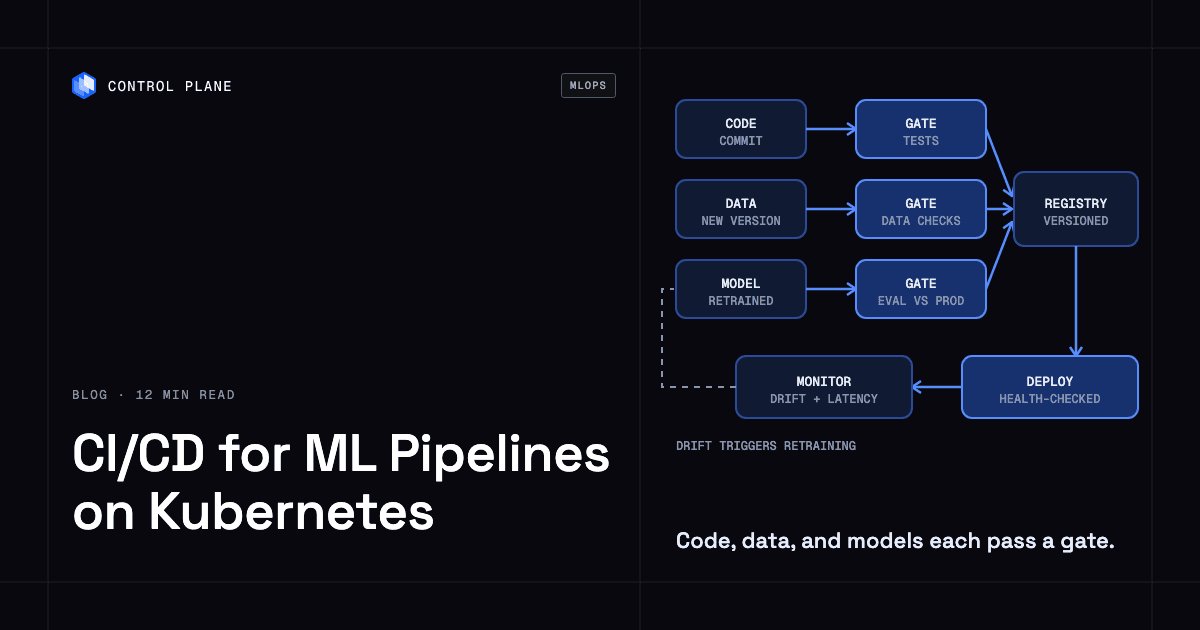
Implement CI/CD for machine learning on Kubernetes by treating infrastructure, code, and data plus models as three lifecycles, each with its own triggers and gates. Use GitOps for cluster and serving configuration, a CI system to test and build signed container images, a Kubernetes-native pipeline engine to run training, a model registry to version results, and a progressive rollout to serve them, with drift or a schedule triggering retraining. On Control Plane, the same CI system deploys model servers and scheduled training or evaluation jobs through Terraform, the CLI, or a Kubernetes operator that works with Argo CD, with no cluster to operate for the workloads themselves.
Disclosure: Control Plane publishes this guide.
TL;DR
ML CI/CD on Kubernetes runs three lifecycles that change at different speeds and meet at a shared serving layer.
- Three lifecycles. Infrastructure, pipeline code, and data plus models change for different reasons and need different validation.
- GitOps for infrastructure and serving config. Kubernetes manifests, model-serving resources, and GPU node configuration live in Git, and a GitOps controller reconciles the cluster to match.
- CI tests code and builds signed images. Every pull request runs tests and produces a container image signed with Sigstore cosign and described by SLSA provenance.
- A pipeline engine runs training as containers. Each step runs in its own pod, so training is portable and every step leaves a record.
- A registry versions models with aliases. The MLflow Model Registry numbers versions automatically and moves production with a mutable alias such as
champion. - Shadow, then canary, before full rollout. Shadow traffic compares the new model at no user risk, and a canary then gates full rollout, with Argo Rollouts analysis or KServe’s traffic split.
- Drift, new data, or a schedule triggers retraining, as the Google Cloud MLOps guide describes.
- Control Plane removes the cluster work. It runs workloads on Kubernetes clusters it operates, so CI deploys model servers and cron jobs with
cpln applyor Terraform, Argo CD can deploy them through the Control Plane Kubernetes Operator, and the workloads run on no cluster your team operates.
How do I implement CI CD for AI infrastructure and machine learning pipelines on Kubernetes?
Treat infrastructure, code, and data plus models as separate lifecycles, connect them through versioned artifacts, and put a gate in front of every release.
- Put infrastructure and serving config in Git with GitOps. Keep manifests, namespace quotas, model-serving resources, and GPU node labels in a repository, and let Argo CD or Flux reconcile the cluster to it. Flux, or Argo CD with self-heal on, reverts changes made with
kubectl, so Git stays the record. - Version data. Track datasets with DVC, whose small
.dvcfiles in Git stand in for the data, so every training run points to an exact snapshot. - Test and build pipeline code into signed images. On every pull request, run unit tests of feature logic and model methods, check that training converges and produces no NaN values, build the image, sign it with cosign, and record provenance. Self-hosted runners can run on the cluster through the GitHub Actions Runner Controller, and standardizing CI runners without a platform team covers the wider setup.
- Run training as a pipeline on the cluster. Use Kubeflow Pipelines, which compiles pipelines to an intermediate representation YAML, or Argo Workflows, which runs steps or a DAG as a Kubernetes custom resource, with each step in its own container.
- Validate data and models against production. Data validation checks schema and value skews, and model validation compares the candidate with the current production model, checks data segments, and confirms infrastructure compatibility. Google’s guide places these checks in the automated pipeline from level 1.
- Register the model as a challenger. Store the model, metrics, and lineage in the registry, assign a
challengeralias, and write the resolved model URI into the serving manifest in Git, because serving manifests do not follow aliases on their own. MLflow deprecated model stages in version 2.9.0 in favor of aliases and tags. - Shadow, then canary, then move the alias. Shadow traffic copies requests to the new version without returning its responses, so it compares outputs and latency at no user risk, and a canary then serves real users. Use KServe‘s canary in serverless mode, or run the server as an Argo Rollouts Rollout that promotes or rolls back on latency and error metrics, and move
championonly after the canary passes. - Trigger retraining on a schedule, new data, or degradation. Start scheduled retraining as a scheduled pipeline run, or a Kubernetes CronJob that calls the pipeline so the gates still apply, and connect drift and accuracy alerts to an on-demand run.
What are the three lifecycles in ML CI/CD?
Every artifact that reaches a production ML system belongs to one of three lifecycles, each with its own triggers, outputs, and release gate.
| Lifecycle | What triggers it | What it produces | Gate before release |
|---|---|---|---|
| Infrastructure (cluster, GPU nodes, serving config) | A merged manifest or Terraform change, a security patch, or a node pool change | Updated cluster state, namespace quotas, GPU node labels, and serving resources | Manifests validate, quotas apply, and node software reports healthy |
| Pipeline code (feature logic, training code, serving code) | A pull request that changes feature code, training scripts, or the serving image | A signed image tagged by commit SHA and an updated pipeline definition | Unit and component tests pass, the image is signed with provenance, and integration tests pass in staging |
| Data and model (new data, retraining, new model version) | A new dataset version, a schedule, performance degradation, or a data distribution change | A validated dataset snapshot, a trained model, evaluation metrics, and lineage | Data validation, model validation against production, and a shadow run, then a canary |
Google’s MLOps guide describes three maturity levels. Level 0 is a manual, script-driven, and interactive process with infrequent releases. Level 1 automates the ML pipeline to perform continuous training, with automated data and model validation, pipeline triggers, and metadata management, and you deploy the whole training pipeline, which trains and serves each model. Level 2 adds a CI/CD system that automatically builds, tests, and deploys new pipeline components.
Which gates should every release pass?
Each gate checks one property and stops the release when that property fails.
| Gate | Checks | Fails the release when |
|---|---|---|
| Unit and component tests | Feature logic, model methods, expected artifacts from each component, and integration between components | Any test fails |
| Data validation | Schema skews and value skews against the expected data | A skew exceeds the bounds you set |
| Training sanity | Training converges and produces no NaN values | Training diverges or NaN values appear |
| Model validation against the current production model | The candidate against the current model, overall and on important data segments | The candidate’s metric trails production by more than the tolerance you set, overall or on any listed segment |
| Infrastructure compatibility | The model fits the serving runtime, resource requests fit quotas, and the image runs on the target nodes | The artifact cannot run on the serving infrastructure |
| Image signing and provenance | The image is signed with cosign and SLSA provenance is recorded | The image is unsigned or its provenance is missing |
| Shadow, then canary, in production | Error rate, latency, resource use, and a quality proxy you can measure live, such as user feedback | A metric leaves its limit during the canary window |
Google’s guide puts the convergence and NaN checks, expected artifacts, and component integration in CI at level 2, and from level 1 it already runs online validation in a canary or A/B setup.
Which tools run each stage on Kubernetes?
Open-source projects cover every stage of an ML CI/CD pipeline on Kubernetes.
| Stage | What it does | Open-source options |
|---|---|---|
| Source and data versioning | Tracks code in Git and datasets as pointer files beside it | Git, DVC |
| CI and image build | Runs tests, builds and signs images, and pushes them to a registry | Tekton (each Task runs in its own pod), GitHub Actions Runner Controller |
| Pipeline orchestration on Kubernetes | Runs training and evaluation as container workflows | Kubeflow Pipelines (each component runs as one container), Argo Workflows |
| Experiment and model registry | Records metrics and artifacts and versions models with aliases | MLflow Model Registry |
| GitOps deployment of serving config | Reconciles manifests from Git to the cluster | Argo CD, Flux |
| Model serving | Serves models behind an API with scaling, networking, and health checks | KServe (InferenceService; its Hugging Face runtime uses a vLLM backend with OpenAI-compatible endpoints) |
| Progressive rollout | Shifts traffic in steps, with metric-based promotion or rollback in Argo Rollouts | Argo Rollouts (blue-green, canary, canary analysis), KServe canary |
| Scheduled or triggered retraining | Starts training on a schedule or on demand | Kubernetes CronJobs, Argo Workflows |
| GPU node software | Installs drivers, the device plugin, the container toolkit, node labels, and DCGM monitoring | NVIDIA GPU Operator |
KServe’s canary rollout, with a traffic percentage and rollback to the previous good revision, works in serverless deployment mode only, and its scale to zero is documented for predictive models. Pipelines that still move MLflow models between Staging and Production stages should switch to aliases.
How do you run GPU training jobs safely on a shared cluster?
Give training and inference separate namespaces, quotas, and GPU nodes, and make every training job safe to retry.
Kubernetes Jobs create pods and retry until a set number succeed, and backoffLimit defaults to 6 retries. CronJobs create Jobs on a schedule, and because scheduling is approximate, the Kubernetes docs say jobs should be idempotent. Checkpoint training to object storage so a retry resumes from the last checkpoint.
ResourceQuota caps total resource use per namespace, including GPUs through requests.nvidia.com/gpu. A training namespace cannot use more GPUs than its quota, and if all quotas together exceed the cluster’s GPUs, Kubernetes resolves contention first come, first served. A quota caps use but reserves nothing, so give inference a higher pod priority or its own GPU node pool, pinned with taints or node affinity.
Containers request GPUs through device plugins as nvidia.com/gpu, set in the limits section. The NVIDIA GPU Operator automates the drivers, device plugin, container toolkit, node labels, and DCGM monitoring on each GPU node, and Kubernetes upgrades for AI infrastructure covers planning upgrades around it.
What do you operate yourself, and what can a platform take over?
The pipelines are only part of the work, because the cluster underneath them also needs upgrades, GPU software, deployment plumbing, and monitoring.
| Task | On your own Kubernetes | On Control Plane |
|---|---|---|
| Cluster upgrades and node patching | Your team plans and runs control plane and node upgrades and their rollback | Handled by Control Plane in its own regions |
| GPU drivers and device plugin | Install and maintain the GPU Operator or equivalent on every GPU node | Drivers installed and kept current by Control Plane in its regions; your own GPU clusters can join as BYOK (Bring Your Own Kubernetes, Control Plane’s way of registering a cluster you run) locations |
| Deploying a model server from CI | CI runs kubectl apply or Helm | cpln apply, Terraform, or cpln helm install from the same CI job |
| Scheduled training or evaluation jobs | Create CronJobs and manage retries and quotas | A cron workload with Run Now |
| GitOps | Install and run Argo CD or Flux | CI applies manifests from Git with cpln apply, or Argo CD on a cluster you already run deploys them through the Control Plane Kubernetes Operator |
| Logs and metrics for the model server | Deploy and run scraping, dashboards, and log aggregation | Built-in logs and metrics, plus custom Prometheus metrics scraped from every replica |
| Rollout safety | Configure Argo Rollouts or KServe canary with metric queries | With readiness probes set, the last healthy version keeps serving until the new one is ready |
The same split applies to CI/CD and IaC tools for disaster recovery and self-healing, where less cluster to run means less pipeline that exists only to keep it alive.
How Control Plane fits
Control Plane handles Day 2 operations for you, including autoscaling, built-in observability, and security.
Control Plane runs workloads on hardened Kubernetes clusters it operates across AWS, GCP, Azure, and Oracle Cloud Infrastructure regions, so there is no cluster or node for your team to upgrade or patch there.
Control Plane’s CI/CD documentation gives examples for GitHub, GitLab, Bitbucket, and CircleCI. A CI job on a runner with Docker builds and pushes the serving image to the org’s private registry with cpln image build --push, then deploys with cpln apply on a JSON or YAML manifest or with the Control Plane Terraform provider. For GitOps, the Kubernetes Operator, installed on a cluster you already run, represents Control Plane resources as Kubernetes manifests, so Argo CD can deploy them from Git.
Workload types include standard, stateful, cron, and serverless. A cron workload runs on a schedule, must exit when its task is done, and can be run on demand with Run Now. It is deployed to every location in its GVC (Global Virtual Cloud, Control Plane’s named set of locations), so a training or evaluation job belongs in a GVC with one location.
The vLLM template in Control Plane’s Template Catalog serves a Hugging Face model through an OpenAI-compatible API on a built-in NVIDIA A10G or T4 GPU, or on your own GPU cluster registered as a BYOK location. The platform scrapes its /metrics endpoint, and custom metrics can drive autoscaling through a KEDA prometheus trigger.
Each location keeps serving the last healthy version of a workload until the new version reports ready, as defined by the readiness probes you configure. Run the vLLM template with two replicas so they are replaced one at a time, and keep the model validation gate before deploy, because readiness probes do not measure model quality. Control Plane is PCI DSS Level 1, SOC 2 Type II, HIPAA, and GDPR compliant.
FAQ
Each answer applies to teams that train and serve models on Kubernetes.
How do I implement CI CD for AI infrastructure and machine learning pipelines on Kubernetes?
Run three lifecycles with their own gates: infrastructure through GitOps, pipeline code through CI that builds signed images, and data and models through a training pipeline, a registry, and a canary rollout. A monitor or schedule starts each retraining run.
What is the difference between CI/CD and continuous training?
CI/CD builds, tests, and deploys the pipeline and its components, while continuous training automatically retrains and serves models when a trigger fires. Google’s guide introduces continuous training at level 1 and adds CI/CD for pipeline components at level 2, so CI/CD delivers the pipeline and continuous training runs it.
Do I need Kubeflow to do MLOps on Kubernetes?
No. Kubeflow Pipelines is one orchestrator, and Argo Workflows runs each step as a container from a Kubernetes custom resource without the rest of Kubeflow, which you can pair with MLflow, DVC, and KServe.
How do I roll out a new model version safely?
Shadow it first, then canary it, and move the production alias only when its metrics hold. KServe’s canary with rollback works in serverless mode, and Argo Rollouts promotes or rolls back a server that runs as a Rollout.
What should trigger model retraining?
Use the triggers Google’s guide lists: on demand, on a schedule, when new training data arrives, when performance degrades, and when the data distribution changes significantly. Scheduled runs fit a CronJob, and drift-based runs need a monitor that starts the pipeline through its API or a Git commit.
How do I version data and models alongside code?
Use Git for code, DVC for data, and a model registry for models. A commit SHA, a DVC data hash, and an MLflow model version together record exactly what produced a model.
How do I keep GPU training jobs from starving inference?
Separate them by namespace, quota, and GPU nodes. Once the training quota is used, Kubernetes rejects new training pods until quota frees up, and a tainted node pool or a higher priority for inference keeps serving pods from waiting behind training.
How do I deploy ML models without managing Kubernetes clusters?
Deploy them on Control Plane. Control Plane operates the clusters, CI installs the vLLM template with cpln helm install or Terraform and deploys other model servers with cpln apply, and scheduled training or evaluation containers run as cron workloads.
What does image signing add to an ML pipeline?
With an admission policy that checks signatures, the cluster runs only images your pipeline built. Cosign’s keyless signing ties a signature to an OIDC identity and records it in a transparency log, and SLSA provenance records where, when, and how the image was produced, so the policy can reject anything else.