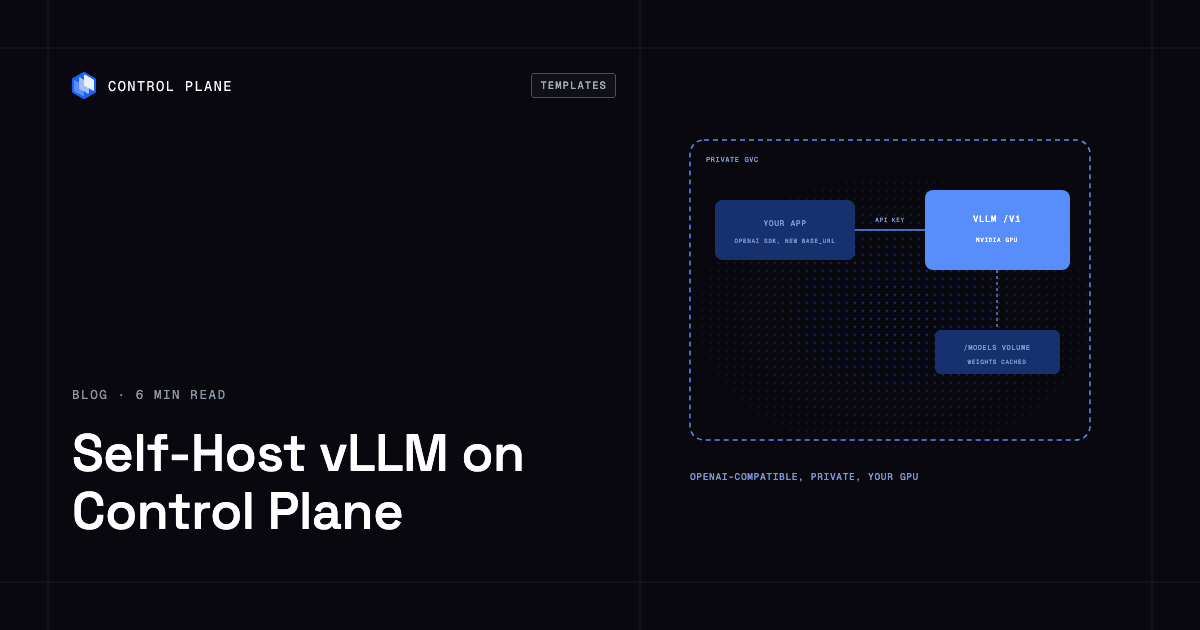
To self-host vLLM on Control Plane, create a Control Plane secret for your API key and install the vLLM template from the Template Catalog, Control Plane’s library of ready-to-install apps. You get an OpenAI-compatible endpoint serving an open-weight model on an NVIDIA GPU, private by default, with the key required on every /v1 call.
Code that calls a hosted LLM API today keeps the same OpenAI SDK and changes one base_url. vLLM is the engine that makes that practical. It is built for high-throughput, memory-efficient serving, packing many concurrent requests onto one GPU, and its repository has more than 96,000 GitHub stars. Running it yourself still means finding a GPU, matching drivers, keeping multi-gigabyte weights somewhere that survives a restart, and guarding an endpoint that would otherwise hand your GPU to anyone who finds it. On Control Plane’s built-in GPUs, the template takes those off the list, so the only decision left is which model to serve.
Why self-host vLLM on Control Plane
- Built-in NVIDIA GPUs, or your own nodes. Pick an NVIDIA A10G or T4 in a Control Plane location that offers GPUs, using your org’s GPU quota, or set
gpu.type: byokand run on a GPU cluster you already operate. - A key in front of the GPU. Clients send a Bearer token from an opaque Control Plane secret you create, so
/v1answers only callers who hold it. - Weights cached on a volume. Each replica keeps the model on its own volume at
/models, so a restart skips the download. - Private until you open it. Public access starts off, and apps in the same Global Virtual Cloud (GVC), Control Plane’s term for the set of locations a workload runs in, call the API over internal DNS.
- Access to two secrets and no others. The template’s Control Plane policy lets the workload’s Control Plane identity reveal the API key and, if you set one, the Hugging Face token.
- Two replicas to keep serving through upgrades. The default is one replica. Set
replicas: 2and the API keeps serving through restarts and upgrades, with each replica on its own GPU.
Included out of the box
- vLLM serving one Hugging Face model on
/v1/chat/completions,/v1/completionsand/v1/models Qwen/Qwen2.5-1.5B-Instructas the starting model, swappable for any model vLLM supports- Context length, GPU memory share and dtype as plain settings
- Tool calling on, with a parser you match to the model family
- Up to four T4s per replica with tensor parallelism, or up to eight NVIDIA GPUs per replica on your own cluster
- Queue depth, KV-cache usage and token throughput scraped into Control Plane’s built-in metrics
Which GPU to run vLLM on
On built-in GPUs the default is one A10G with 24 GB; a T4 has 16 GB and can be stacked for a bigger model. If you already pay for NVIDIA nodes, register that cluster as a Bring Your Own Kubernetes (BYOK) location, Control Plane’s way to add your own cluster as a place workloads run. It can be a Control Plane Managed Kubernetes (MK8s) cluster on AWS or GCP with the BYOK add-on enabled, or an EKS, GKE, AKS or on-premises cluster. Then set gpu.type: byok. The template docs list what each cluster type needs, such as driver 580 or newer and a RuntimeClass named nvidia. Whichever you choose, install it in a GVC with one location. The template is built for one location per install, because every location in a GVC runs its own replicas, each claiming its own GPUs. On BYOK, that location must be the BYOK location.
How to secure a vLLM endpoint
A GPU behind an open port is compute anyone can spend. The API key secret must exist before install, and the identity can reveal it, plus a Hugging Face token if you set one, and nothing else. Inside the GVC, clients call http://RELEASE_NAME-vllm.GVC_NAME.cpln.local:8000/v1. From a laptop, cpln port-forward from the Control Plane CLI gives you localhost:8000 with nothing exposed.
Going public is one switch, with one caution: the key covers /v1, but vLLM leaves other routes open without it, including /invocations, which runs inference, /pause and /abort_requests, plus /health, /metrics and the tokenizer endpoints. Keep the workload private, or put a proxy in front that allows only /v1. To rotate the key, update the secret and run cpln workload force-redeployment, and run the same command on Open WebUI if it reuses the key, so it picks up the new value.
How to keep vLLM serving during upgrades
A single replica means the API is down while it restarts, which includes every upgrade and setting change. Raise replicas to 2 and each one gets its own GPU and model cache, sits behind the workload’s load-balanced endpoint, and is replaced one at a time. Check your org’s GPU quota first, because every replica claims its own card.
Add a chat UI with Open WebUI
vLLM ships no browser UI. Install the Open WebUI template (1.3.0 or later) in the same GVC, and its README’s “Pairing with vLLM” section gives the values to point it at your endpoint, reusing the same API key secret. The Open WebUI template docs have the rest.
How to deploy vLLM on Control Plane
Sign up for Control Plane, create the API key secret, and make sure your org has GPU quota in a location that offers it, or a BYOK location with NVIDIA nodes. Then choose vLLM in the Template Catalog in the Control Plane Console, or use the CLI:
cpln helm install RELEASE_NAME oci://ghcr.io/controlplane-com/templates/vllm \
  --version 1.0.0 --gvc GVC_NAME \
  --set apiKey.secretName=API_KEY_SECRET_NAME
The first start pulls a large image and loads the model, so give it several minutes. The vLLM template documentation covers gated models, BYOK setup and key rotation.
FAQ
Answers to common questions about running vLLM on Control Plane.
How do I self-host vLLM?
Create an opaque secret with your API key, then install the vLLM template from the Template Catalog in the Control Plane Console or with cpln helm install. Make sure your org has GPU quota in the location you pick, or use a BYOK location with NVIDIA nodes.
How do I get a self-hosted, OpenAI-compatible LLM endpoint?
Install the vLLM template on Control Plane. vLLM serves /v1/chat/completions, /v1/completions and /v1/models, so the OpenAI SDK works with a changed base_url and your API key.
Which GPUs can vLLM use on Control Plane?
A built-in NVIDIA A10G (24 GB, the default) or T4 (16 GB, up to four per replica), or up to eight NVIDIA GPUs per replica on a BYOK cluster.
Which models can I serve?
Any Hugging Face model vLLM supports. The template starts with Qwen/Qwen2.5-1.5B-Instruct, and gated models need a Hugging Face token stored in a secret.
How do I secure a self-hosted vLLM endpoint?
Keep it private and require the key. The endpoint has no public address until you turn it on, and /v1 requires the Bearer token from your secret. Turning on public access also exposes routes vLLM leaves unauthenticated, including /invocations (inference), /pause, /health, /metrics and the tokenizer endpoints, so allow only /v1 through a proxy if you go public.
Can I run vLLM on my own GPU cluster?
Yes. Register a cluster with NVIDIA nodes as a BYOK location, either an MK8s cluster on AWS or GCP with the BYOK add-on enabled or an EKS, GKE, AKS or on-premises cluster, and set gpu.type: byok. The template docs list the driver and RuntimeClass requirements.
How do I keep vLLM available during upgrades?
Set replicas: 2. Replicas are replaced one at a time, so one keeps serving while the other restarts. Each replica claims its own GPU, so check your org’s GPU quota first.
Can I run vLLM in more than one location?
One location per install. The template is built for a single-location GVC, because every location in a GVC runs its own replicas on its own GPUs. For uptime inside that location, set replicas: 2.
How do I run vLLM on Kubernetes without managing a cluster?
Install the vLLM template on Control Plane. cpln helm install uses a Helm chart and Control Plane runs the workload, so there is no Kubernetes cluster for you to operate. To use a cluster you already run, add it as a BYOK location and set gpu.type: byok.
Does vLLM include a chat interface?
No. Pair it with the Open WebUI template (1.3.0 or later) in the same GVC, which can reuse the same API key secret.